
Wiki mirrorView source
The information in this page is updated in accordance with firmware version RUT2M_R_00.07.22.1.
Summary
The Mobile page is used to configure mobile connection settings.
This manual page provides an overview of the Mobile page in RUT200 devices.
General
The General page is used to configure SIM card parameters that define how the device will establish a mobile connection.
Status
The Status section is used to configure main SIM card parameters. Refer to the figure and table below for information on the fields contained in that section.
SIM configuration
| Field | Value | Description |
|---|---|---|
| Deny data roaming | off | on; default: off | Denies data connection on roaming conditions. |
| PIN | integer [0000..99999999]; default: none | SIM card's PIN (Personal Identification Number) is a secret numeric password used to authenticate the device to the SIM card. PIN codes are comprised of numbers only and the length can range from 4 to 8 symbols. PIN number is saved in flash memory therefore it does not reset when default settings are restored. |
Interface mob1s1a1 APN configuration
| Field | Value | Description |
|---|---|---|
| Auto APN | on | off; default: on | Auto APN scans an internal APN database and selects an APN based on the SIM card's operator and country. If the first automatically selected APN doesn't work, it attempts to use the next existing APN from the database ( APN database ) |
| APN | string; default: none | An Access Point Name (APN) is a gateway between a GSM, GPRS, 3G or 4G mobile network and another computer network. Depending on the contract, some operators may require you to use an APN just to complete the registration on a network. In other cases, APN is used to get special parameters from the operator (e.g., a public IP address) depending on the contract. An APN Network Identifier cannot start with any of the following strings:
|
| Authentication type | None | PAP | CHAP; default: None | Authentication method that your carrier uses to authenticate new connections on it's network |
| Username | string; default: empty | Username provided by your carrier |
| Password | string; default: empty | Password provided by your carrier |
Connection
Connection
| Field | Value | Description |
|---|---|---|
| VoLTE | Auto | On | Off; default: Auto | Enables Voice over LTE, a digital packet technology that uses 4G LTE networks to route voice traffic and transmit data. |
| Preferred network type | 4G/3G/2G auto | 3G/2G auto | 4G only | 3G only | 2G only; default: 4G/3G/2G auto | |
| Band selection | Auto | Manual; default: Auto | Network frequency band selection method. When set to Auto, the device connects to the band with the best connectivity conditions, while Manual provides the possibility to manually select the bands which the device will obliged to use. Selecting bands manually shows their duplex modes for 4G and 5G capable devices only. |
| LTE bands | Band list; default: empty | RUT200 Supported Frequency Bands that can be selected from the list. |
| UMTS bands | Band list; default: empty | RUT200 Supported Frequency Bands that can be selected from the list. |
| GSM bands | Band list; default: empty | RUT200 Supported Frequency Bands that can be selected from the list. |
Low signal reconnect
The Low signal reconnect section is used to configure modem operator connection resetting based on signal strength .
Important: This section applies only to the RUT200 model equipped with the SLM750 modem.

| Field | Value | Description |
|---|---|---|
| Enable | off | on; default: off | Enables Low signal reconnect. |
| Reset threshold | integer [-120..-50]; default: none | Signal threshold in dB for the connection. When signal is under this value modem resets connection. |
| Reset timeout | integer [15..65535]; default: 600 | Time for the device to wait in seconds before trying to reset the connection again. |
Limits
Data limit
The Data Limit section provides you with the possibility to set up a maximum used data cap for your SIM card.
To configure Data Limit press Edit
| Field | Value | Description |
|---|---|---|
| Enable data connection limit | off | on; default: off | Disables mobile data when the limit for the current period is reached |
| Data limit (MB) | integer; default: none | Disable mobile data after the limit value in MB is reached |
| Reset period | Day | Week | Month; default: Day | Interval for resetting mobile data usage limit. |
| Reset time | 0-23 / Monday - Sunday / 0-31; default: 0 | Specify the hour (in 24-hour format) when the mobile data limit reset occurs. |
| Enable SMS warning | on | off; default: off | Enables sending of warning SMS message when mobile data limit is reached. |
| Warning threshold | integer; default: none | Send warning SMS message after threshold in MB is reached. Warning threshold cannot be higher than data limit! |
| Phone number | integer; default: none | A phone number to send warning SMS message to |
| Clear collected data | - (interactive button) | The data collected for this interface will be cleared, but only if the interface is active |
SMS limit
The SMS Limit section provides you with the possibility to set up a maximum sent SMS message cap for your SIM card.
To configure SMS Limit press Edit
| Field | Value | Description |
|---|---|---|
| Enable SMS Limit | off | on; default: off | Turns SMS limiting on or off. |
| SMS limit count | integer; default: none | Sets the SMS sending cap, i.e., how many SMS messages can be sent from this SIM card during the specified period. |
| Period | Day | Week | Month; default: Day | Period for which SMS limiting should apply. After the period expires, the SMS limit counter will be reset. |
| Reset time | 0-23 / Monday - Sunday / 0-31; default: 0 | Starting hour of the day / day of the week / day of the month for SMS limiting period. |
| Clear SMS Limit | - (interactive button) | Clears the SMS limit counter for the selected period. |
Network selection
The Network operators section provides you with the possibility to scan for and manage mobile network operators to which the device's SIM card can connect to.
| Field | Value | Description |
|---|---|---|
| Current operator | string; default: none | Displays the name of the operator the which the device is currently connected. |
| Connection mode | Auto | Manual | Manual-Auto; default: Auto | Operator selection method.
|
Manual operator selection
To select an operator manually, specify Connection mode: Manual and click 'Scan For Operators'.
Will be prompted with a pop-up asking if you're sure. Click 'Scan' if you wish to proceed.
Wait for the scan to finish. As indicated by the onscreen message, the process can take up to 3 minutes.
Once the scan has finished, you will see the results in the 'Available operators'.
In order to lock the SIM card to using a single operator, select operator from Operator code field and click 'Save & Apply'.
Operators list
This section is used to create lists of operators codes, which can then be used in Operator settings section
to Whitelist of Blacklist them. Operator code consists of two parts - Mobile Country Code (MCC) and Mobile Network Code (MNC).
By clicking Edit  on a list you will be redirected to editing page in which you can enter operator codes for that list.
on a list you will be redirected to editing page in which you can enter operator codes for that list.
Utilities
SIM PIN management
| Field | Value | Description |
|---|---|---|
| SIM card lock | off | on; default: off | Correct PIN code is required to enable or disable SIM card lock. Once SIM card lock is disabled you will not need to enter PIN code on any device to use SIM card. |
| Change PIN | - (interactive button) | Open modal window to change SIM PIN |
USSD
Unstructured Supplementary Service Data (USSD) is communication protocol used in communication between cellular devices and mobile network operators. It is usually used with prepaid SIM cards to enable/disable certain services or to obtain information from a network operator.
This section provides the possibility to send USSD messages to the mobile operator.
| Field | Value | Description |
|---|---|---|
| USSD | string; default: none | Enter a USSD code (up to 182 character) that you wish to send. To send the entered USSD code, click the 'Send' button below the Response box. |
| Send | - (interactive button) | Click to send the message entered in the USSD field. |
| Response message | string; default: No response yet | Displays the response to the last sent USSD message. Receiving the response may take up to a minute. |
PIN/PUK lock notification
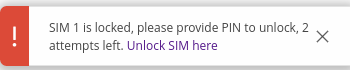
If you set an invalid PIN/PUK code or insert a locked/blocked SIM card, a side message will pop up with information that the SIM card is locked or blocked. Click 'Unlock SIM here` to open the modal window where you can enter the SIM card PIN/PUK codes.
Side message where the SIM is locked
Side message where the SIM is blocked

| Field | Value | Description |
|---|---|---|
| PIN | 4-8 positive numeric chars (positive number); default: none | SIM card's PIN (Personal Identification Number) is a secret numeric password shared between a user and a system that can be used to authenticate the user. PIN is saved in flash memory, it will be saved after device reset. |
| PUK | 8 positive numeric chars (positive number); default: none | SIM PUK (Personal Unblocking Key) is a code consisting of 8 digits. It is used to unblock your SIM card when you entered 3 times a wrong PIN code |
APN Database
APN stands for Access Point Name and allows a device's network to connect to the internet. With the APN settings in place, your device builds a connection to a carrier's gateway. APN Database page section provides you with possibility to create/edit/delete APN records.
Note: APN Database is additional software that can be installed from the System → Package Manager page.
Adding new APN
In order to create new APN to database, insert required information and click Add button.
| Field | Value | Description |
|---|---|---|
| Carrier name | default: empty | Carrier name - name of a company that sells wireless connectivity to customers for cellphone data and telephone calls. It may also be called a mobile network operator, a mobile carrier, cellular company or wireless service provider. |
| Mobile Country Code | default: empty | Mobile Country Code (MCC) - a mobile code consisting of three digits used to identify GSM networks. MCC is also used along with the International Mobile Subscriber Identity (IMSI) to identify the region from which mobile subscriber belongs. |
| Mobile Network Code | default: empty | Mobile Network Code (MNC) - a unique two- or three-digit number used to identify a home Public Land Mobile Network (PLMN) to. MNC is allocated by the national regulator. |
| APN | default: empty | APN (Access Point Name) is configurable network identifier used by a mobile device when connecting to a carrier |
| PDP type | IPv4/IPv6 | IPv4 | IPv6; default: IPv4/IPv6 | Specifies what type of address is requested from the operator |
| Authentication type | none | PAP | CHAP; default: none | Authentication method that your GSM carrier uses to authenticate new connections on it's network |
| Username | default: empty | Your username that you would use to connect to your GSM carrier's network |
| Password | default: empty | Your password that you would use to connect to your GSM carrier's network |