
Wiki mirrorView source
The information in this page is updated in accordance with firmware version RUT2M_R_00.07.22.1.
Summary
The System page displays general information related to the hardware, software and memory state of the device.
This chapter of the user manual provides an overview of the System page for RUT200 devices.
System
The figure below is an example of the System page and the table below provides information on the fields displayed in that page:
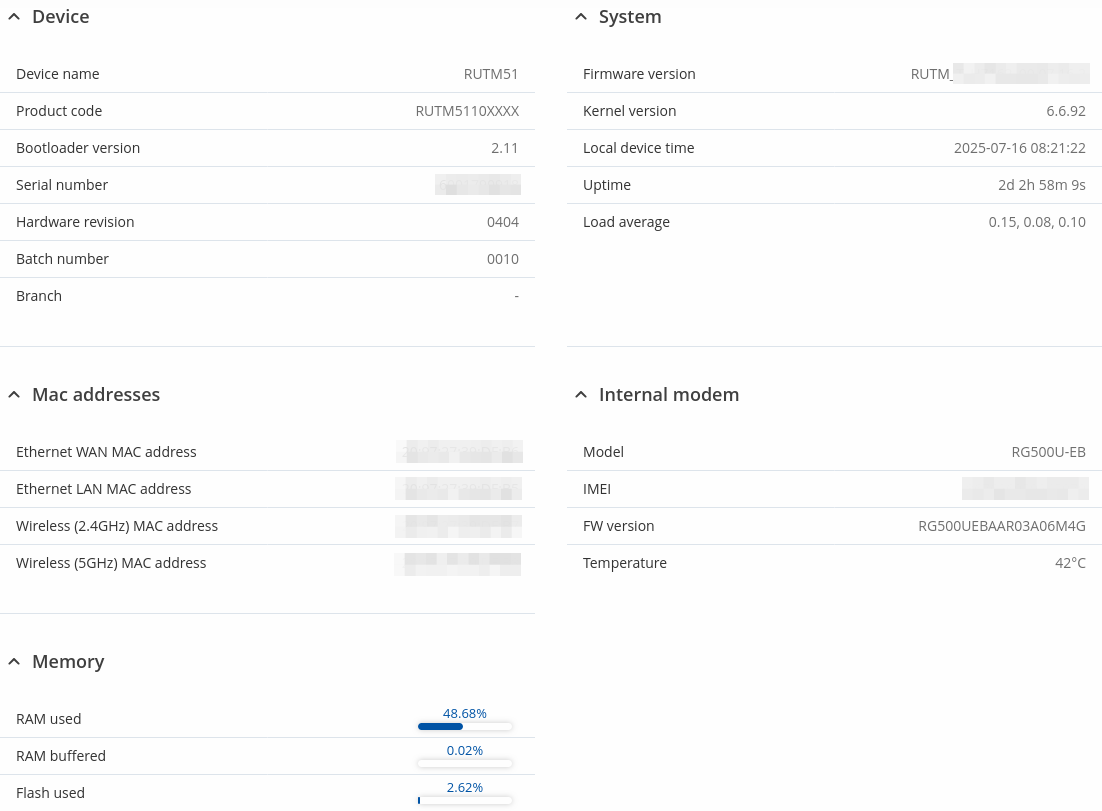
| Field Name | Description |
|---|---|
| Device name | The name of this device. |
| Product code | a.k.a., ordering code; displays under which product code the device was manufactured. Different product codes indicate different versions of the overall product. For example, devices with different product codes may support different LTE bands, come with different accessories, different firmware, etc. |
| Bootloader version | Bootloader version currently used by the device. A Bootloader is a program that loads the operating system. |
| Serial number | A unique 10-digit device identifier. It is required when connecting the device to Teltonika's Remote Management System (RMS). The device can be added to RMS via the Services → Cloud Solutions → RMS page. |
| Hardware revision | A 4-digit number representing the router's hardware revision version. |
| Batch number | A 4-digit number that indicates the batch of materials. |
| Branch | Hardware branch identifier. |
| Firmware version | Firmware version currently used by the device. The firmware can be upgraded from the System → Firmware page. You can download firmwares for RUT200 from here. |
| Kernel version | Kernel version currently used by the device. A kernel is a computer program responsible for connecting a device's software to its hardware. |
| Local device time | Current time as perceived by the device. Time settings can be adjusted in the System → Administration → NTP page. |
| Uptime | Amount of time that has passed since the device was last turned on or rebooted. |
| Load average | CPU load average (in %) over the last minute, 5 minutes and 15 minutes. |
| Ethernet LAN MAC address | MAC address of the LAN interface. |
| Ethernet WAN MAC address | MAC address of the WAN interface. |
| Wireless (2.4GHZ) MAC address | MAC address of the 2.4 GHz wireless interface. |
| Model | Model number of the modem inside of the device. |
| IMEI | The IMEI (International Mobile Equipment Identity) is a unique 15 decimal digit number used to identify mobile modules. GSM network operators use the IMEI to identify devices in their networks. |
| FW version | Firmware version of the modem inside of the device. |
| Temperature | Modem's current temperature. |
| RAM used | Amount of random-access memory (RAM) that is currently in use by the device. |
| RAM Buffered | Amount of random-access memory (RAM) used by temporarily stored data before moving it to another location. |
| Flash used | Amount of Flash (storage) memory that is currently in use by the device. |