
Wiki mirrorView source
The information in this page is updated in accordance with firmware version RUTX_R_00.07.22.1.
Summary
Site Manager is a centralized management interface used to configure, monitor, and maintain devices and services within a site. This gives administrators the ability to view device status, grouping, and change device settings.
Overview
The Devices > Overview page provides a centralized view of all devices discovered or managed within the site.
When you first visit the overview page, you will be asked if you want to enable the website manager feature:
Once the feature is enabled, the site manager automatically scans the network and searches for supported devices (currently TAP and TSW series devices are supported).
This page is used to:
To start pairing the devices, press the "Pair" button (status changes from Unpaired -> Pairing -> Syncing -> Paired). Note: sometimes you are asked to enter the device password.
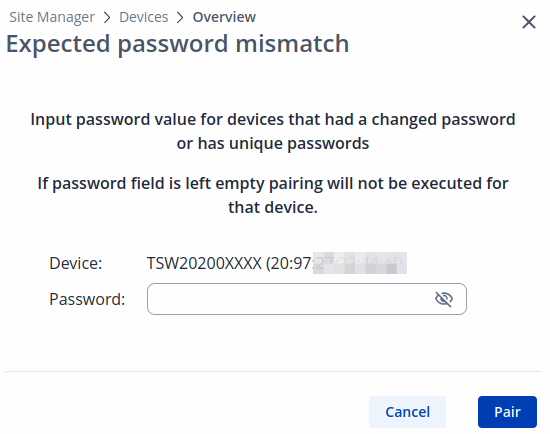
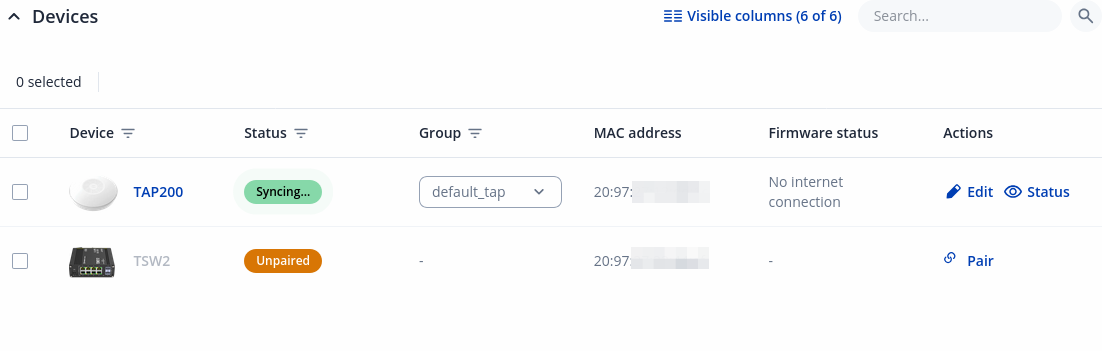 Note: After successful pairing, the devices WebUI becomes unavailable.
Note: After successful pairing, the devices WebUI becomes unavailable.
Actions
There are two actions types when devices are paired.
Edit action for TAP access points:
Status action for TAP access points:
Displays basic information about the paired TAP device and allows you to perform three main functions: edit device settings (RUTX11_Site_Manager#Edit_action_for_TAP_access_points:), reboot the device, or upgrade it:
Edit action for TSW switches:
Status action for TSW switches:
Displays basic information about the paired TSW device and allows you to perform three main functions: edit device settings (RUTX11_Site_Manager#Edit_action_for_TSW_switches:), reboot the device, or upgrade it:
Groups
The Devices › Groups page in Site Manager is used to view, create, and manage device groups by platform type. Device groups help organize and apply configurations to similar devices (such as access points or switches) in a centralized way.
To `add` a new group, enter a name and select device type. To `edit`, press edit button next to the group:
| Field | Value | Description |
|---|---|---|
| Group name | string; default: default_tap/switch | Name of the group. |
| Default group | off | on; default: on | Turn on to set this group as the default. |
| Platform | Access points | Switches; default: | Device type. |
General Settings
On the General Settings page, you can enable or disable the Site Manager service and change passwords across all devices. Device password will be updated upon pairing.
| Field | Value | Description |
|---|---|---|
| Enable | off | on; default: on | Enable or disable Site manager service. |
| New password | string; default: | New password across all devices. |
| Confirm new password | string; default: | Repeat new password across all devices. |